
Telekom MagentAI Analytics: From Fabric Demo to Production-Ready Architecture
Telekom MagentAI: An End-to-End Analytics Demo
Telekom MagentAI Analytics: From Fabric Demo to Production-Ready Architecture
How Microsoft Fabric, Azure and Databricks can turn AI-agent telemetry into governed operational intelligence

Updated September 2026
Executive summary
The MagentAI Analytics Demo is a working end-to-end solution built in Microsoft Fabric. It shows how service, incident and AI-agent data can move from source files through Bronze, Silver and Gold layers into a governed Power BI semantic model and interactive reports.
The demo deliberately uses CSV files in SharePoint, making the complete analytical lifecycle reproducible without access to a production AI platform. The same model can later receive data from APIs, databases, event streams, telemetry platforms or an existing Azure data estate.
The article clearly separates the implemented demo from three production choices: Fabric native, modular Azure with Databricks and a hybrid Azure–Fabric target state. Fabric offers the most integrated experience; Azure and Databricks provide greater component-level control; the hybrid model is often the most pragmatic option for an enterprise that already operates Azure ingestion and storage and uses Power BI strategically.
The business problem: measure both service outcomes and AI quality
An AI-supported service platform does more than produce chat transcripts. It generates a connected sequence of business and technical events: a user intent is detected, knowledge is retrieved, one or more tools may be called, a response is generated, the conversation may be handed over to an employee and the customer may provide feedback.
The analytical platform therefore needs to answer three different classes of questions.
Business outcomes
How many customer journeys were completed without human intervention?
Which intents, channels, services or regions create the most workload?
Where do handovers occur, and what happens after the handover?
How do AI-supported journeys affect customer satisfaction and first-contact resolution?
Which incidents or service problems drive repeated contacts?
AI and retrieval quality
Did the agent identify the user’s intent and complete the requested task?
Was the answer grounded in retrieved knowledge?
Did the agent select the correct tool and use its output successfully?
Which model, prompt or knowledge-base version was active?
Where do evaluation scores deteriorate after a release?
Operational efficiency
What are end-to-end and per-step latency, error rate and availability?
How many input and output tokens are consumed?
What is the cost per conversation, resolved case or successful task?
Are event volumes, schema, freshness and data-quality results within agreed thresholds?
Microsoft’s current agent-evaluation guidance includes task completion, intent resolution, groundedness, relevance and tool-call metrics. Its observability guidance also emphasizes latency, error rates, token consumption and quality scores. These signals belong in the analytical model next to business KPIs—not in a separate technical dashboard that no business owner sees.
Model the journey before choosing the platform
The most important design decision is not whether the solution uses a Lakehouse or a Warehouse. It is the grain of the analytical facts.
For the MagentAI scenario, useful atomic facts include:
Conversation fact: one row per conversation or service journey.
Turn fact: one row per user or agent turn.
Agent-step fact: one row per reasoning, action or orchestration step that may be stored under the organization’s logging policy.
Retrieval fact: one row per retrieval attempt and returned document reference.
Tool-call fact: one row per tool invocation, including status, latency and error information.
Handover fact: one row per transfer to a human agent, with reason and outcome.
Feedback fact: one row per explicit or inferred evaluation event.
Ticket and incident facts: one row per operational case or network incident.
Conformed dimensions can then describe date and time, channel, intent, customer segment, region, service, model deployment, prompt version, knowledge source and organizational unit.
This follows the dimensional-modeling discipline popularized by Ralph Kimball: declare the grain first, then add dimensions and measurable facts that are true to that grain. It prevents ambiguous KPIs such as “handover rate” or “successful request” from being implemented differently in every report.
A production event contract should also carry stable identifiers and operational metadata. At minimum, consider conversation_id, turn_id, trace_id, event time in UTC, source-system time, model and prompt version, outcome, latency, token counts, error code, retrieval references, tool result, data classification and ingestion metadata. Personally identifiable information should be minimized, classified, redacted or pseudonymized before broad analytical use, with retention rules aligned to the data class.
Variant 1: the implemented Microsoft Fabric demo
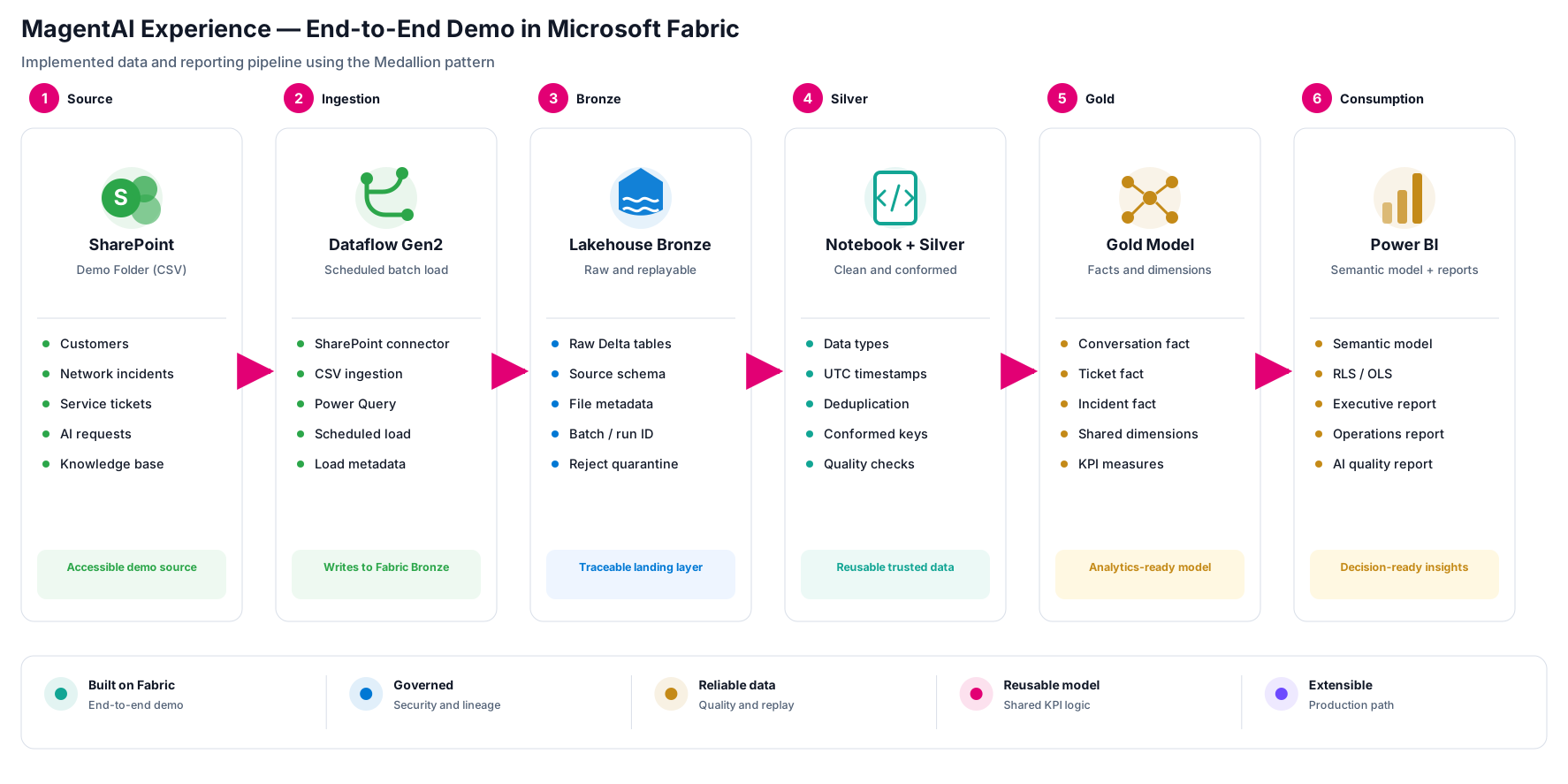
The implemented solution uses a simple, auditable batch flow:
SharePoint → Dataflow Gen2 → Bronze Lakehouse → Silver transformations → Gold model → Power BI semantic model → reports
Demonstrated results at a glance
The demo is a functional reference implementation, not a synthetic performance benchmark. Its results should therefore be stated as verified capabilities rather than invented throughput or cost figures.
Capability | Demonstrated result |
|---|---|
Source ingestion | Five related CSV datasets loaded from SharePoint through Dataflow Gen2 |
Traceability | Raw records retained in Bronze; full file and run metadata remains a production-hardening step |
Data preparation | Types, timestamps, keys, duplicates and quality rules handled in Silver |
Analytical model | Facts, dimensions and reusable KPI logic organized in Gold |
Consumption | Governed Power BI semantic model with executive, operational and AI-quality views |
Production benchmark | Refresh duration, peak volume, concurrency, capacity use and cost are not yet benchmarked |
Before production rollout, the final row should be replaced with measured results from representative data volumes and peak workloads.
Source and ingestion
The demo source consists of five CSV datasets in a SharePoint folder:
customers.csvnetwork_incidents.csvservice_tickets.csvai_requests.csvknowledge_base.csv
Dataflow Gen2 centralizes the SharePoint connection and Power Query logic and writes the source data to a Fabric Lakehouse. For a demonstration, this is preferable to embedding source access in notebooks or reports because ingestion remains visible, reusable and independently schedulable.
Bronze: preserve and replay
Bronze stores data close to the delivered source structure. In addition to the business columns, a robust Bronze table should capture the source file, ingestion timestamp, batch or run ID and—where available—a source extraction timestamp. Invalid records should not silently disappear; they should be quarantined with a reason so that data-quality failures can be measured and corrected.
Bronze is not “bad data.” It is the traceable record of what the source delivered.
Silver: establish trust
Fabric notebooks convert the raw tables into typed, standardized and reusable structures. Typical transformations include timestamp normalization, deduplication, standardized categories, conformed keys, null handling and explicit data-quality rules.
Silver should contain the reusable business entities and atomic events needed by more than one report or model. Data-quality results should also be stored as data, allowing teams to monitor completeness, validity, uniqueness and freshness over time.
Gold: create a stable analytical contract
The Gold layer organizes data into facts and dimensions at a declared grain. Measures such as request volume, containment, handover rate, incident resolution, customer satisfaction and AI latency should be derived from this stable contract.
Gold does not need to contain only pre-aggregated tables. Atomic fact tables preserve analytical flexibility; aggregates should be added where they deliver a clear performance or usability benefit.
Semantic model and reports
The Power BI semantic model centralizes relationships, measures, KPI definitions and security. Depending on the scale and source design, the model can use Import or Direct Lake. Direct Lake is particularly attractive for large Fabric Delta tables because it uses the VertiPaq engine without requiring a traditional full import refresh, but storage mode should still be chosen and tested against performance, feature and capacity requirements.
The implemented report can present three clear perspectives:
Executive overview: service performance, incident trends, AI adoption and the most important outcome KPIs.
Service and incident operations: tickets, priorities, services, regions, status and resolution behavior.
AI quality and operations: agent volume, task outcomes, handovers, retrieval quality, latency, errors and cost.
This variant is ideal for demos, workshops, training and early validation. It proves the complete lifecycle, but it is not yet a production architecture: file delivery, monitoring, privacy controls, CI/CD, capacity management, recovery and operational ownership remain simplified.
Variant 2: Fabric-native production architecture
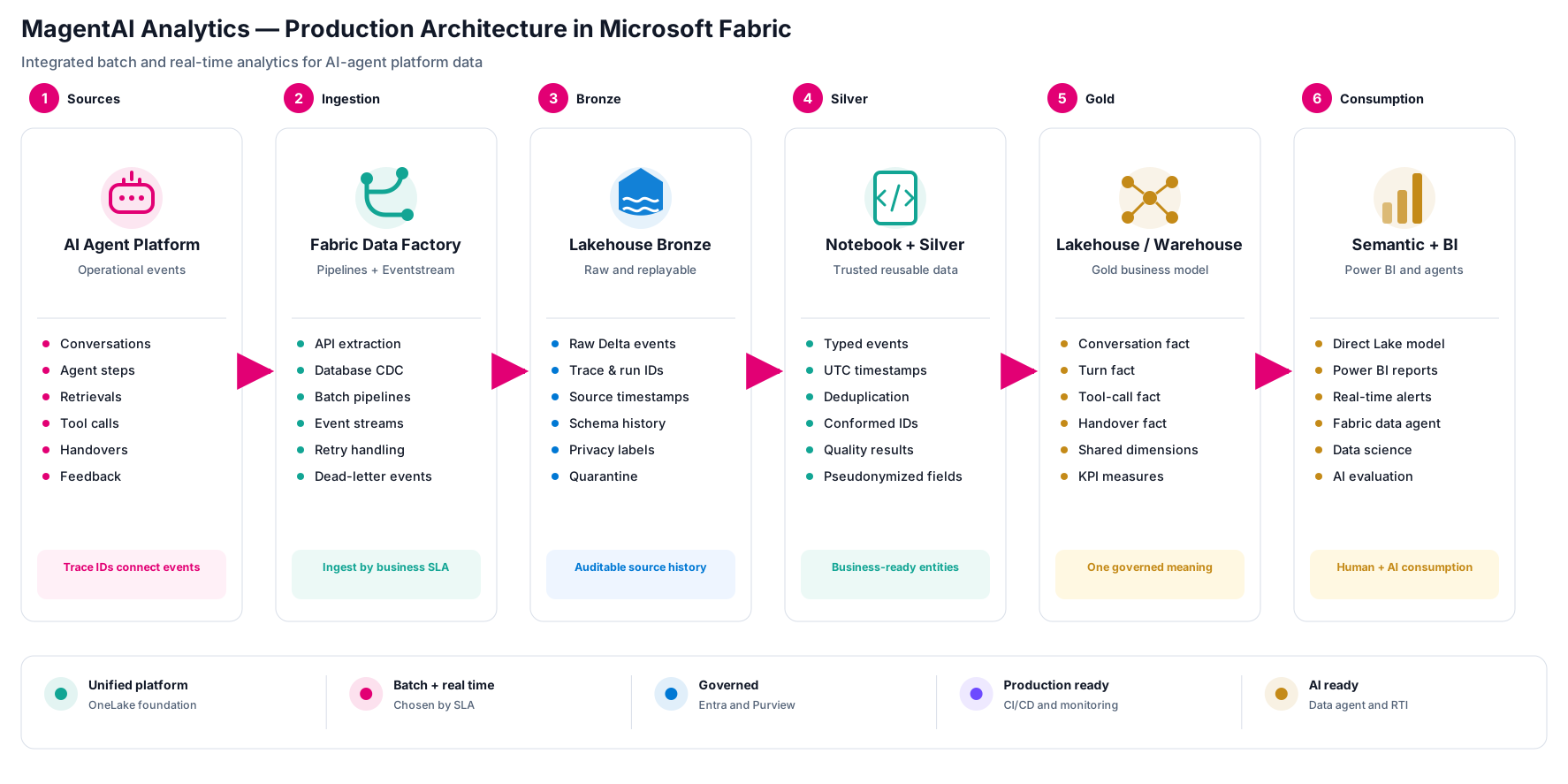
A production-grade Fabric design keeps the integrated platform experience but replaces the SharePoint source with operational interfaces and explicit batch and streaming paths.
Ingestion by service-level objective
Fabric Data Factory pipelines and Dataflow Gen2 are appropriate for scheduled ingestion, API extraction, database copies, incremental loads and visually authored Power Query transformations. Eventstream and Real-Time Intelligence are appropriate when telemetry or agent events need lower-latency processing.
The choice should follow the business SLA. A daily reference table does not become better because it is streamed; a handover spike that requires an immediate operational response should not wait for a nightly batch.
Production ingestion should include idempotency, watermarks or change data capture (CDC) where supported, schema checks, retry policy, dead-letter or quarantine handling and observable run metadata.
OneLake storage and processing
The Lakehouse remains the durable analytical store for Delta tables. An Eventhouse and KQL can complement it for high-volume, time-oriented or low-latency signals. Bronze preserves replayable source events; Silver conforms and validates them; Gold exposes the business model through a Lakehouse or Warehouse.
Microsoft documents the Medallion pattern as a supported Fabric design, but Bronze, Silver and Gold are responsibilities—not a requirement to create three copies of every byte. Separate Lakehouses, schemas or workspaces should be chosen based on ownership, security, lifecycle and operational needs.
Consumption beyond a dashboard
A governed semantic model remains the primary contract for Power BI measures, security and reusable business definitions. The same trusted foundation can also support:
Real-time dashboards and alerts
Data science and feature preparation
AI functions for controlled enrichment
A Fabric data agent for read-only, permission-aware conversational access
Graph analysis when relationship-heavy questions justify it
These are optional consumers, not a reason to add every Fabric workload to the initial release.
Optional roadmap. Copilot experiences, ontology and graph-powered agent reasoning remain preview or region-dependent as of September 2026. They should not be presented as implemented production capabilities until availability, security, capacity and support requirements have been validated.
What makes this production-ready
The architecture needs more than pipelines and notebooks:
Entra-based identity, least privilege, OneLake security, row-level security (RLS) and object-level security (OLS)
Cataloging, lineage, classification and Purview integration
Git integration, deployment pipelines and separate development, test and production workspaces
Central monitoring, workspace logs, data-quality SLAs and actionable alerts
Capacity testing, workload isolation and cost accountability
Recovery objectives, OneLake protection and tested rebuild procedures
Fabric-native is strongest for a new or consolidating analytics platform that wants a managed SaaS experience and deep Power BI integration. It is less attractive when an organization already owns a mature Azure platform whose integration, networking and operating model would be duplicated.
Variant 3: modular Azure and Databricks architecture
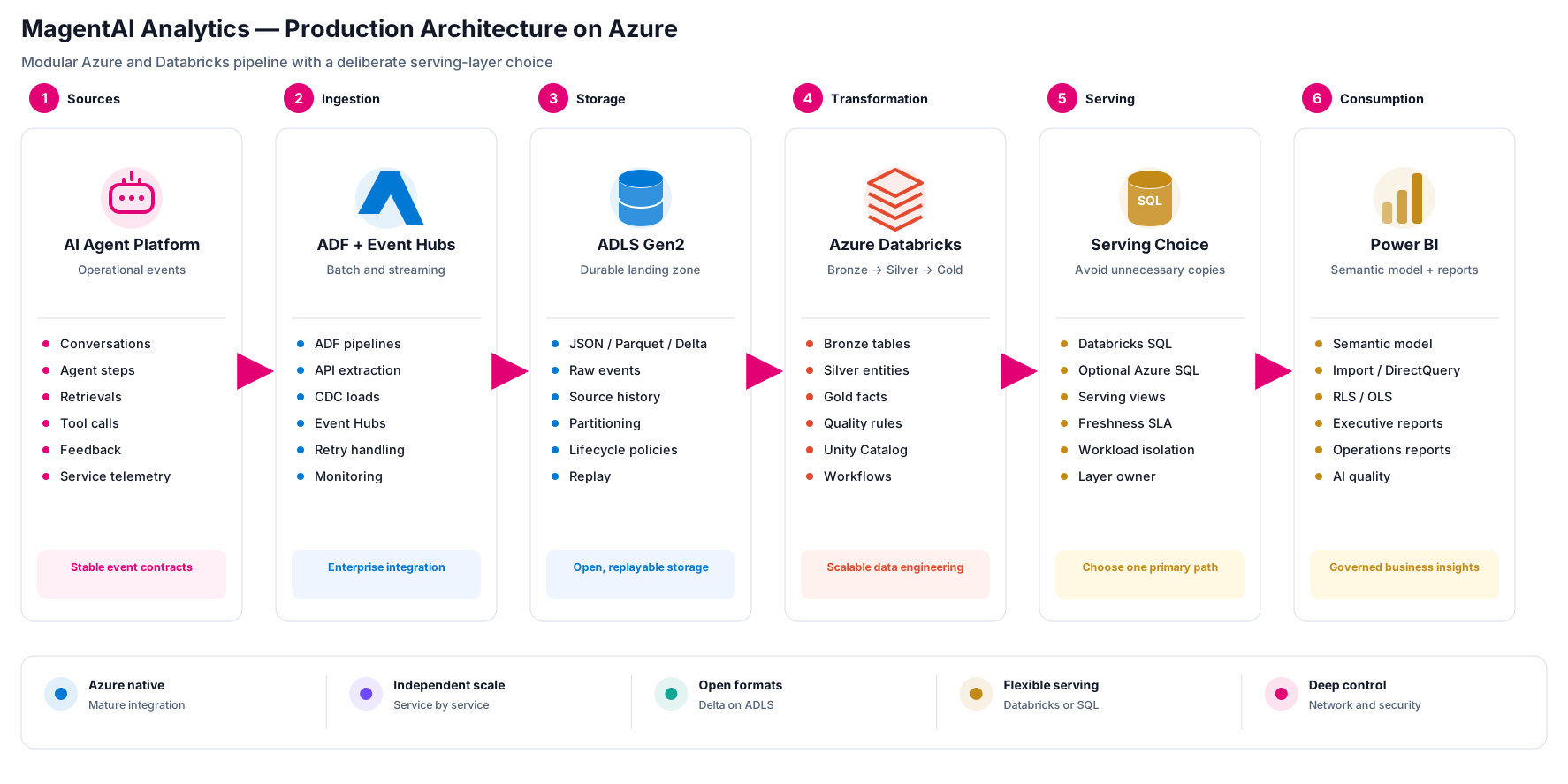
The modular Azure variant separates responsibilities across independently operated services:
Operational sources → Azure Data Factory and/or Event Hubs → ADLS Gen2 → Azure Databricks → serving layer → Power BI
Azure Data Factory (ADF) orchestrates batch and CDC-style movement. Event Hubs can capture streaming events. ADLS Gen2 retains raw and historical data in open analytical formats. Azure Databricks applies the Bronze, Silver and Gold pattern with Delta Lake and provides scalable engineering, data-quality and governance capabilities.
Correct the serving-layer assumption
An important architectural correction is that Azure SQL Database is not mandatory between Databricks and Power BI.
Power BI can connect directly to an Azure Databricks SQL Warehouse. This is often the cleaner serving path when Databricks owns the Gold tables and the organization wants to avoid another copied relational layer.
Azure SQL remains a valid optional serving layer when it provides a concrete benefit—for example, an established relational SLA, operational integration, a standardized enterprise serving pattern or workload isolation that cannot be achieved adequately through Databricks SQL. If it is introduced, the team must define ownership, synchronization, freshness, failure behavior and the cost of the extra copy.
This variant is strongest where Azure and Databricks skills, networking, infrastructure-as-code, Unity Catalog and operating processes are already mature. Its trade-off is integration overhead: identity, monitoring, lineage, deployment, billing and incident response cross more platform boundaries.
Variant 4: recommended hybrid Azure and Fabric target state
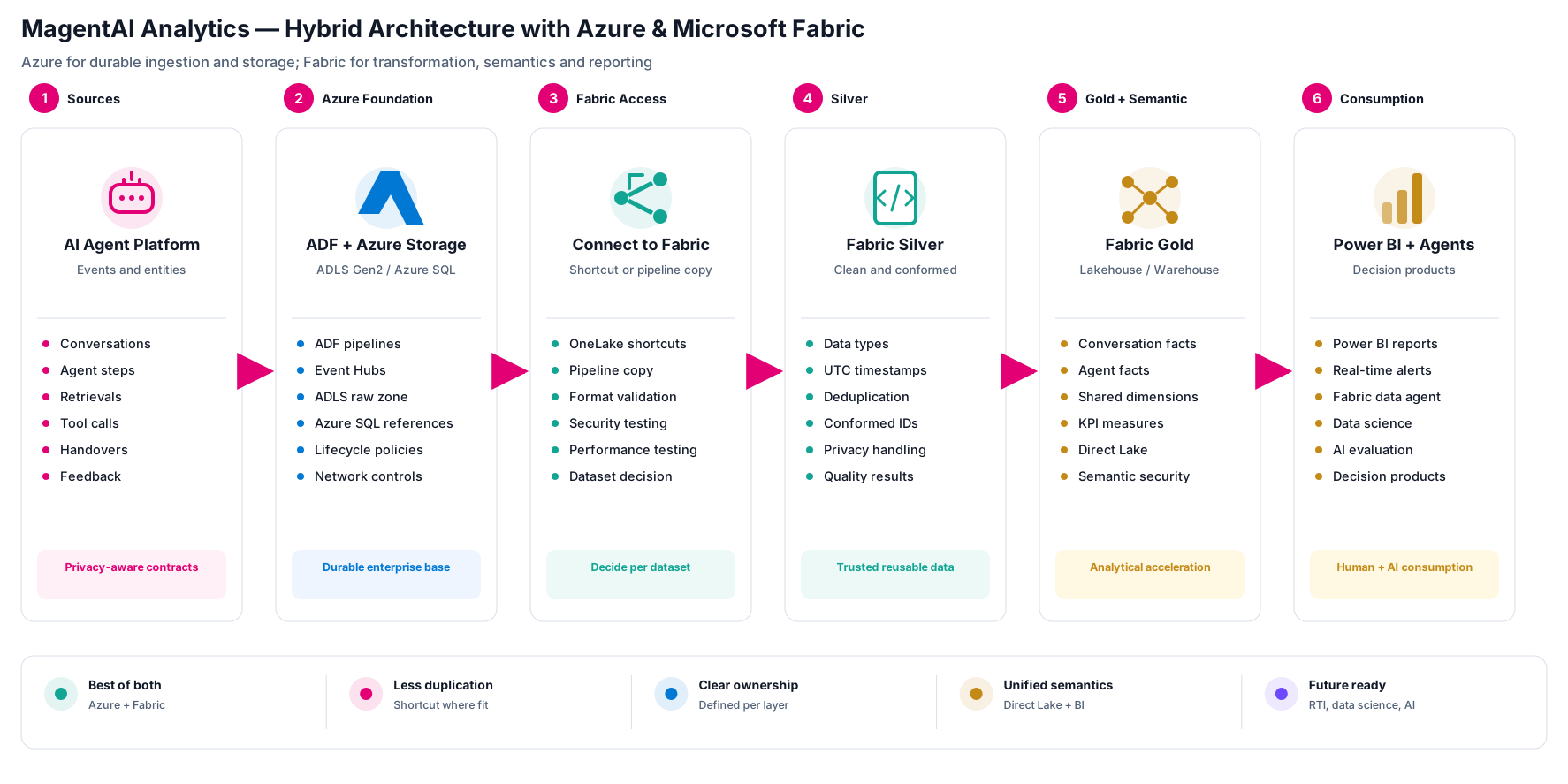
The hybrid design separates the durable enterprise data foundation from the analytical acceleration layer.
Azure remains the durable foundation
Azure retains responsibility for enterprise source connectivity, batch and event ingestion, raw and historical storage, established networking, lifecycle policies and operational controls. ADLS Gen2 should normally be the authoritative analytical landing zone for file and event data. Azure SQL remains appropriate for structured operational or reference data where a relational source is the right fit.
Fabric accesses data deliberately
Fabric can reference ADLS Gen2 data through a OneLake shortcut without creating a complete second copy. This can reduce onboarding time, storage duplication and synchronization risk while preserving Azure as the authoritative location.
“Zero-copy,” however, should not be read as “zero architecture.” Teams still need to test permissions, network paths, file and table formats, performance, region alignment, failure behavior and cost. A shortcut is a reference to external data; it does not transfer operational ownership to Fabric.
A Fabric pipeline copy is preferable when the analytical platform requires an independent retention policy, controlled snapshots, workload isolation, Fabric-managed recovery, a different physical layout or a predictable performance boundary. The shortcut-versus-copy decision should be documented per dataset rather than applied as a platform-wide slogan.
Fabric becomes the analytical acceleration layer
Fabric notebooks, Lakehouses and Warehouses build the conformed Silver and business-ready Gold layers. Direct Lake semantic models, Power BI, Real-Time Intelligence, data science and governed agent experiences can then consume the data within the Fabric platform.
The hybrid model is not automatically cheaper or simpler. It succeeds only with a clear responsibility matrix:
Who owns the source contract and the authoritative copy?
Who responds to ingestion, shortcut and transformation failures?
Which platform enforces retention and deletion?
Where are data-quality rules implemented and reported?
Which team owns capacity, performance and cost?
How is lineage maintained across Azure and Fabric?
For an established Azure organization, this model offers a controlled modernization path without a big-bang migration.
Cross-cutting production controls
Regardless of platform, the following capabilities should be visible in the architecture and backlog.
Security and privacy
Use Microsoft Entra ID, managed or workspace identities where supported, least-privilege role-based access control (RBAC) and private connectivity where required. Separate platform access from report-level security. RLS and OLS protect semantic-model consumption; they do not replace source, storage or workspace permissions.
Conversation content may contain personal or sensitive information. Minimize collection, redact or pseudonymize where possible, classify data, restrict raw-text access and define retention and deletion processes before broadening analytical access.
Data quality and observability
Monitor more than job success. A green pipeline can still deliver stale, empty or semantically invalid data. Track freshness, volume, schema drift, completeness, uniqueness, referential integrity and business-rule failures. Store quality outcomes with dataset, rule, run and timestamp so that trends and ownership are visible.
For the AI agent itself, monitor task completion, intent resolution, groundedness, relevance, tool-call success, latency, errors, tokens and cost. Tie these metrics back to model, prompt, knowledge and release versions.
Application lifecycle management
Use source control, code review, parameterization and separate development, test and production stages. Fabric supports Git integration and deployment pipelines for supported items, but item coverage and preview status should be checked before defining continuous integration and delivery (CI/CD). Data changes need test data, reconciliation and rollback or replay procedures—not only code deployment.
Capacity, cost and resilience
Define workload SLAs and test peak concurrency. In Fabric, capacity is shared across workloads, so pipelines, notebooks, semantic models, AI features and real-time components can affect one another. In Azure, independent services reduce that coupling but create multiple cost and scaling models.
Document recovery time and recovery point objectives. Fabric provides OneLake data protection and optional disaster-recovery capabilities, but teams still need experience-specific recovery plans, version-controlled definitions and tested rebuild procedures.
Architecture decision matrix
Variant | Choose it when | Main strength | Main trade-off | Status |
|---|---|---|---|---|
Implemented demo | The goal is a workshop, proof of concept or fast validation | Low entry barrier and visible end-to-end flow | Simplified source, operations and resilience | Implemented |
Fabric native | A new or consolidating platform prioritizes managed operation and Power BI integration | OneLake, engineering, real time and BI in one platform | Shared capacity and platform concentration require active governance | Production design |
Azure + Databricks | A mature Azure estate needs modular scaling, networking and service-level control | Independent services, open formats and deep engineering control | More integration, deployment and monitoring boundaries | Production design |
Hybrid Azure + Fabric | Existing Azure ingestion and storage should be retained while BI is modernized | Incremental adoption with shortcuts or controlled copies | Ownership and SLAs must be explicit across both platforms | Recommended production design |
The quickest decision rule is simple: use the demo to prove value, Fabric native for a unified new platform, Azure and Databricks for maximum modular control, and the hybrid model when a working Azure foundation should be extended rather than rebuilt.
A pragmatic migration path
The hybrid target state can be adopted in controlled steps:
Stabilize the event contract. Agree identifiers, grain, timestamps, privacy fields, model and prompt versions and quality signals.
Keep current Azure ingestion and storage. Do not replace working enterprise integration without a business reason.
Connect one bounded domain to Fabric. Use a shortcut or controlled copy based on ownership, SLA and performance requirements.
Build Silver and Gold around declared grains. Validate counts and KPIs against the existing platform.
Create the semantic model and Power BI product. Centralize measures, security and definitions before adding agent experiences.
Operationalize. Add CI/CD, monitoring, quality thresholds, capacity tests, alert ownership and recovery procedures.
Add real-time and AI features selectively. Introduce them only when latency or user experience creates measurable value.
Review platform placement over time. Move or retain transformations based on evidence, not a blanket migration target.
Conclusion
The implemented SharePoint-based solution proves the full analytical flow from source ingestion to Power BI. Production readiness adds stable event contracts, measurable data quality, privacy, lifecycle management, observability, capacity planning and recovery.
Fabric native provides the most integrated Microsoft analytics experience; Azure and Databricks provide modularity and deeper infrastructure control. For an organization with an established Azure foundation and a strategic Power BI direction, the hybrid model often creates the strongest balance:
Azure provides the durable enterprise data foundation. Microsoft Fabric turns that foundation into governed, scalable and AI-ready decision products.
Power BI, Microsoft Fabric and Azure analytics consulting
Architecture, implementation and optimization for scalable reporting, reliable data models and decision-ready analytics.
E-mail: info@ks-intelligence.net
Phone: +49 173 2692005
Selected technical references
Updated September 2026
Executive summary
The MagentAI Analytics Demo is a working end-to-end solution built in Microsoft Fabric. It shows how service, incident and AI-agent data can move from source files through Bronze, Silver and Gold layers into a governed Power BI semantic model and interactive reports.
The demo deliberately uses CSV files in SharePoint, making the complete analytical lifecycle reproducible without access to a production AI platform. The same model can later receive data from APIs, databases, event streams, telemetry platforms or an existing Azure data estate.
The article clearly separates the implemented demo from three production choices: Fabric native, modular Azure with Databricks and a hybrid Azure–Fabric target state. Fabric offers the most integrated experience; Azure and Databricks provide greater component-level control; the hybrid model is often the most pragmatic option for an enterprise that already operates Azure ingestion and storage and uses Power BI strategically.
The business problem: measure both service outcomes and AI quality
An AI-supported service platform does more than produce chat transcripts. It generates a connected sequence of business and technical events: a user intent is detected, knowledge is retrieved, one or more tools may be called, a response is generated, the conversation may be handed over to an employee and the customer may provide feedback.
The analytical platform therefore needs to answer three different classes of questions.
Business outcomes
How many customer journeys were completed without human intervention?
Which intents, channels, services or regions create the most workload?
Where do handovers occur, and what happens after the handover?
How do AI-supported journeys affect customer satisfaction and first-contact resolution?
Which incidents or service problems drive repeated contacts?
AI and retrieval quality
Did the agent identify the user’s intent and complete the requested task?
Was the answer grounded in retrieved knowledge?
Did the agent select the correct tool and use its output successfully?
Which model, prompt or knowledge-base version was active?
Where do evaluation scores deteriorate after a release?
Operational efficiency
What are end-to-end and per-step latency, error rate and availability?
How many input and output tokens are consumed?
What is the cost per conversation, resolved case or successful task?
Are event volumes, schema, freshness and data-quality results within agreed thresholds?
Microsoft’s current agent-evaluation guidance includes task completion, intent resolution, groundedness, relevance and tool-call metrics. Its observability guidance also emphasizes latency, error rates, token consumption and quality scores. These signals belong in the analytical model next to business KPIs—not in a separate technical dashboard that no business owner sees.
Model the journey before choosing the platform
The most important design decision is not whether the solution uses a Lakehouse or a Warehouse. It is the grain of the analytical facts.
For the MagentAI scenario, useful atomic facts include:
Conversation fact: one row per conversation or service journey.
Turn fact: one row per user or agent turn.
Agent-step fact: one row per reasoning, action or orchestration step that may be stored under the organization’s logging policy.
Retrieval fact: one row per retrieval attempt and returned document reference.
Tool-call fact: one row per tool invocation, including status, latency and error information.
Handover fact: one row per transfer to a human agent, with reason and outcome.
Feedback fact: one row per explicit or inferred evaluation event.
Ticket and incident facts: one row per operational case or network incident.
Conformed dimensions can then describe date and time, channel, intent, customer segment, region, service, model deployment, prompt version, knowledge source and organizational unit.
This follows the dimensional-modeling discipline popularized by Ralph Kimball: declare the grain first, then add dimensions and measurable facts that are true to that grain. It prevents ambiguous KPIs such as “handover rate” or “successful request” from being implemented differently in every report.
A production event contract should also carry stable identifiers and operational metadata. At minimum, consider conversation_id, turn_id, trace_id, event time in UTC, source-system time, model and prompt version, outcome, latency, token counts, error code, retrieval references, tool result, data classification and ingestion metadata. Personally identifiable information should be minimized, classified, redacted or pseudonymized before broad analytical use, with retention rules aligned to the data class.
Variant 1: the implemented Microsoft Fabric demo
The implemented solution uses a simple, auditable batch flow:
SharePoint → Dataflow Gen2 → Bronze Lakehouse → Silver transformations → Gold model → Power BI semantic model → reports
Demonstrated results at a glance
The demo is a functional reference implementation, not a synthetic performance benchmark. Its results should therefore be stated as verified capabilities rather than invented throughput or cost figures.
Capability | Demonstrated result |
|---|---|
Source ingestion | Five related CSV datasets loaded from SharePoint through Dataflow Gen2 |
Traceability | Raw records retained in Bronze; full file and run metadata remains a production-hardening step |
Data preparation | Types, timestamps, keys, duplicates and quality rules handled in Silver |
Analytical model | Facts, dimensions and reusable KPI logic organized in Gold |
Consumption | Governed Power BI semantic model with executive, operational and AI-quality views |
Production benchmark | Refresh duration, peak volume, concurrency, capacity use and cost are not yet benchmarked |
Before production rollout, the final row should be replaced with measured results from representative data volumes and peak workloads.
Source and ingestion
The demo source consists of five CSV datasets in a SharePoint folder:
customers.csvnetwork_incidents.csvservice_tickets.csvai_requests.csvknowledge_base.csv
Dataflow Gen2 centralizes the SharePoint connection and Power Query logic and writes the source data to a Fabric Lakehouse. For a demonstration, this is preferable to embedding source access in notebooks or reports because ingestion remains visible, reusable and independently schedulable.
Bronze: preserve and replay
Bronze stores data close to the delivered source structure. In addition to the business columns, a robust Bronze table should capture the source file, ingestion timestamp, batch or run ID and—where available—a source extraction timestamp. Invalid records should not silently disappear; they should be quarantined with a reason so that data-quality failures can be measured and corrected.
Bronze is not “bad data.” It is the traceable record of what the source delivered.
Silver: establish trust
Fabric notebooks convert the raw tables into typed, standardized and reusable structures. Typical transformations include timestamp normalization, deduplication, standardized categories, conformed keys, null handling and explicit data-quality rules.
Silver should contain the reusable business entities and atomic events needed by more than one report or model. Data-quality results should also be stored as data, allowing teams to monitor completeness, validity, uniqueness and freshness over time.
Gold: create a stable analytical contract
The Gold layer organizes data into facts and dimensions at a declared grain. Measures such as request volume, containment, handover rate, incident resolution, customer satisfaction and AI latency should be derived from this stable contract.
Gold does not need to contain only pre-aggregated tables. Atomic fact tables preserve analytical flexibility; aggregates should be added where they deliver a clear performance or usability benefit.
Semantic model and reports
The Power BI semantic model centralizes relationships, measures, KPI definitions and security. Depending on the scale and source design, the model can use Import or Direct Lake. Direct Lake is particularly attractive for large Fabric Delta tables because it uses the VertiPaq engine without requiring a traditional full import refresh, but storage mode should still be chosen and tested against performance, feature and capacity requirements.
The implemented report can present three clear perspectives:
Executive overview: service performance, incident trends, AI adoption and the most important outcome KPIs.
Service and incident operations: tickets, priorities, services, regions, status and resolution behavior.
AI quality and operations: agent volume, task outcomes, handovers, retrieval quality, latency, errors and cost.
This variant is ideal for demos, workshops, training and early validation. It proves the complete lifecycle, but it is not yet a production architecture: file delivery, monitoring, privacy controls, CI/CD, capacity management, recovery and operational ownership remain simplified.
Variant 2: Fabric-native production architecture
A production-grade Fabric design keeps the integrated platform experience but replaces the SharePoint source with operational interfaces and explicit batch and streaming paths.
Ingestion by service-level objective
Fabric Data Factory pipelines and Dataflow Gen2 are appropriate for scheduled ingestion, API extraction, database copies, incremental loads and visually authored Power Query transformations. Eventstream and Real-Time Intelligence are appropriate when telemetry or agent events need lower-latency processing.
The choice should follow the business SLA. A daily reference table does not become better because it is streamed; a handover spike that requires an immediate operational response should not wait for a nightly batch.
Production ingestion should include idempotency, watermarks or change data capture (CDC) where supported, schema checks, retry policy, dead-letter or quarantine handling and observable run metadata.
OneLake storage and processing
The Lakehouse remains the durable analytical store for Delta tables. An Eventhouse and KQL can complement it for high-volume, time-oriented or low-latency signals. Bronze preserves replayable source events; Silver conforms and validates them; Gold exposes the business model through a Lakehouse or Warehouse.
Microsoft documents the Medallion pattern as a supported Fabric design, but Bronze, Silver and Gold are responsibilities—not a requirement to create three copies of every byte. Separate Lakehouses, schemas or workspaces should be chosen based on ownership, security, lifecycle and operational needs.
Consumption beyond a dashboard
A governed semantic model remains the primary contract for Power BI measures, security and reusable business definitions. The same trusted foundation can also support:
Real-time dashboards and alerts
Data science and feature preparation
AI functions for controlled enrichment
A Fabric data agent for read-only, permission-aware conversational access
Graph analysis when relationship-heavy questions justify it
These are optional consumers, not a reason to add every Fabric workload to the initial release.
Optional roadmap. Copilot experiences, ontology and graph-powered agent reasoning remain preview or region-dependent as of September 2026. They should not be presented as implemented production capabilities until availability, security, capacity and support requirements have been validated.
What makes this production-ready
The architecture needs more than pipelines and notebooks:
Entra-based identity, least privilege, OneLake security, row-level security (RLS) and object-level security (OLS)
Cataloging, lineage, classification and Purview integration
Git integration, deployment pipelines and separate development, test and production workspaces
Central monitoring, workspace logs, data-quality SLAs and actionable alerts
Capacity testing, workload isolation and cost accountability
Recovery objectives, OneLake protection and tested rebuild procedures
Fabric-native is strongest for a new or consolidating analytics platform that wants a managed SaaS experience and deep Power BI integration. It is less attractive when an organization already owns a mature Azure platform whose integration, networking and operating model would be duplicated.
Variant 3: modular Azure and Databricks architecture
The modular Azure variant separates responsibilities across independently operated services:
Operational sources → Azure Data Factory and/or Event Hubs → ADLS Gen2 → Azure Databricks → serving layer → Power BI
Azure Data Factory (ADF) orchestrates batch and CDC-style movement. Event Hubs can capture streaming events. ADLS Gen2 retains raw and historical data in open analytical formats. Azure Databricks applies the Bronze, Silver and Gold pattern with Delta Lake and provides scalable engineering, data-quality and governance capabilities.
Correct the serving-layer assumption
An important architectural correction is that Azure SQL Database is not mandatory between Databricks and Power BI.
Power BI can connect directly to an Azure Databricks SQL Warehouse. This is often the cleaner serving path when Databricks owns the Gold tables and the organization wants to avoid another copied relational layer.
Azure SQL remains a valid optional serving layer when it provides a concrete benefit—for example, an established relational SLA, operational integration, a standardized enterprise serving pattern or workload isolation that cannot be achieved adequately through Databricks SQL. If it is introduced, the team must define ownership, synchronization, freshness, failure behavior and the cost of the extra copy.
This variant is strongest where Azure and Databricks skills, networking, infrastructure-as-code, Unity Catalog and operating processes are already mature. Its trade-off is integration overhead: identity, monitoring, lineage, deployment, billing and incident response cross more platform boundaries.
Variant 4: recommended hybrid Azure and Fabric target state
The hybrid design separates the durable enterprise data foundation from the analytical acceleration layer.
Azure remains the durable foundation
Azure retains responsibility for enterprise source connectivity, batch and event ingestion, raw and historical storage, established networking, lifecycle policies and operational controls. ADLS Gen2 should normally be the authoritative analytical landing zone for file and event data. Azure SQL remains appropriate for structured operational or reference data where a relational source is the right fit.
Fabric accesses data deliberately
Fabric can reference ADLS Gen2 data through a OneLake shortcut without creating a complete second copy. This can reduce onboarding time, storage duplication and synchronization risk while preserving Azure as the authoritative location.
“Zero-copy,” however, should not be read as “zero architecture.” Teams still need to test permissions, network paths, file and table formats, performance, region alignment, failure behavior and cost. A shortcut is a reference to external data; it does not transfer operational ownership to Fabric.
A Fabric pipeline copy is preferable when the analytical platform requires an independent retention policy, controlled snapshots, workload isolation, Fabric-managed recovery, a different physical layout or a predictable performance boundary. The shortcut-versus-copy decision should be documented per dataset rather than applied as a platform-wide slogan.
Fabric becomes the analytical acceleration layer
Fabric notebooks, Lakehouses and Warehouses build the conformed Silver and business-ready Gold layers. Direct Lake semantic models, Power BI, Real-Time Intelligence, data science and governed agent experiences can then consume the data within the Fabric platform.
The hybrid model is not automatically cheaper or simpler. It succeeds only with a clear responsibility matrix:
Who owns the source contract and the authoritative copy?
Who responds to ingestion, shortcut and transformation failures?
Which platform enforces retention and deletion?
Where are data-quality rules implemented and reported?
Which team owns capacity, performance and cost?
How is lineage maintained across Azure and Fabric?
For an established Azure organization, this model offers a controlled modernization path without a big-bang migration.
Cross-cutting production controls
Regardless of platform, the following capabilities should be visible in the architecture and backlog.
Security and privacy
Use Microsoft Entra ID, managed or workspace identities where supported, least-privilege role-based access control (RBAC) and private connectivity where required. Separate platform access from report-level security. RLS and OLS protect semantic-model consumption; they do not replace source, storage or workspace permissions.
Conversation content may contain personal or sensitive information. Minimize collection, redact or pseudonymize where possible, classify data, restrict raw-text access and define retention and deletion processes before broadening analytical access.
Data quality and observability
Monitor more than job success. A green pipeline can still deliver stale, empty or semantically invalid data. Track freshness, volume, schema drift, completeness, uniqueness, referential integrity and business-rule failures. Store quality outcomes with dataset, rule, run and timestamp so that trends and ownership are visible.
For the AI agent itself, monitor task completion, intent resolution, groundedness, relevance, tool-call success, latency, errors, tokens and cost. Tie these metrics back to model, prompt, knowledge and release versions.
Application lifecycle management
Use source control, code review, parameterization and separate development, test and production stages. Fabric supports Git integration and deployment pipelines for supported items, but item coverage and preview status should be checked before defining continuous integration and delivery (CI/CD). Data changes need test data, reconciliation and rollback or replay procedures—not only code deployment.
Capacity, cost and resilience
Define workload SLAs and test peak concurrency. In Fabric, capacity is shared across workloads, so pipelines, notebooks, semantic models, AI features and real-time components can affect one another. In Azure, independent services reduce that coupling but create multiple cost and scaling models.
Document recovery time and recovery point objectives. Fabric provides OneLake data protection and optional disaster-recovery capabilities, but teams still need experience-specific recovery plans, version-controlled definitions and tested rebuild procedures.
Architecture decision matrix
Variant | Choose it when | Main strength | Main trade-off | Status |
|---|---|---|---|---|
Implemented demo | The goal is a workshop, proof of concept or fast validation | Low entry barrier and visible end-to-end flow | Simplified source, operations and resilience | Implemented |
Fabric native | A new or consolidating platform prioritizes managed operation and Power BI integration | OneLake, engineering, real time and BI in one platform | Shared capacity and platform concentration require active governance | Production design |
Azure + Databricks | A mature Azure estate needs modular scaling, networking and service-level control | Independent services, open formats and deep engineering control | More integration, deployment and monitoring boundaries | Production design |
Hybrid Azure + Fabric | Existing Azure ingestion and storage should be retained while BI is modernized | Incremental adoption with shortcuts or controlled copies | Ownership and SLAs must be explicit across both platforms | Recommended production design |
The quickest decision rule is simple: use the demo to prove value, Fabric native for a unified new platform, Azure and Databricks for maximum modular control, and the hybrid model when a working Azure foundation should be extended rather than rebuilt.
A pragmatic migration path
The hybrid target state can be adopted in controlled steps:
Stabilize the event contract. Agree identifiers, grain, timestamps, privacy fields, model and prompt versions and quality signals.
Keep current Azure ingestion and storage. Do not replace working enterprise integration without a business reason.
Connect one bounded domain to Fabric. Use a shortcut or controlled copy based on ownership, SLA and performance requirements.
Build Silver and Gold around declared grains. Validate counts and KPIs against the existing platform.
Create the semantic model and Power BI product. Centralize measures, security and definitions before adding agent experiences.
Operationalize. Add CI/CD, monitoring, quality thresholds, capacity tests, alert ownership and recovery procedures.
Add real-time and AI features selectively. Introduce them only when latency or user experience creates measurable value.
Review platform placement over time. Move or retain transformations based on evidence, not a blanket migration target.
Conclusion
The implemented SharePoint-based solution proves the full analytical flow from source ingestion to Power BI. Production readiness adds stable event contracts, measurable data quality, privacy, lifecycle management, observability, capacity planning and recovery.
Fabric native provides the most integrated Microsoft analytics experience; Azure and Databricks provide modularity and deeper infrastructure control. For an organization with an established Azure foundation and a strategic Power BI direction, the hybrid model often creates the strongest balance:
Azure provides the durable enterprise data foundation. Microsoft Fabric turns that foundation into governed, scalable and AI-ready decision products.
Power BI, Microsoft Fabric and Azure analytics consulting
Architecture, implementation and optimization for scalable reporting, reliable data models and decision-ready analytics.
E-mail: info@ks-intelligence.net
Phone: +49 173 2692005